I Switched to the Avast Premium Antivirus and Here is What Happened
For laptop users, the digital landscape has never felt more precarious. As portable machines become our primary hubs for work, banking, and personal communication, the stakes for device security have escalated. While many rely on the built-in protections provided by operating systems, there is a growing segment of power users and professionals who find themselves questioning if standard security is sufficient. This inquiry led to a comprehensive transition to Avast Premium Antivirus, a move designed to test whether a dedicated, paid security suite truly yields a tangible difference in the day-to-day laptop experience.
The journey from basic security to a premium subscription is often motivated by a specific catalyst—perhaps a close call with a phishing email, a noticeable slowdown in system performance due to background processes, or simply the need for better privacy controls in an era of invasive data tracking. By integrating Avast Premium Antivirus into a high-performance laptop environment, the goal was to observe its impact on system resources, its efficacy in blocking modern threats, and its ability to streamline the user’s digital life without the intrusive "nagware" often associated with security software.
The Initial Experience: Installation and Interface
The transition began with a streamlined installation process that stands in contrast to the bloated setups of the early 2000s. Modern laptop users prioritize speed and efficiency; they do not want to wait twenty minutes for a security suite to initialize. Avast Premium Antivirus registered a relatively small footprint during the setup phase. Once active, the interface presented a clean, dark-themed dashboard that emphasizes clarity over complexity. For a laptop user who might be switching between a compact 13-inch screen and a large external monitor, the responsive design of the UI is a significant benefit.
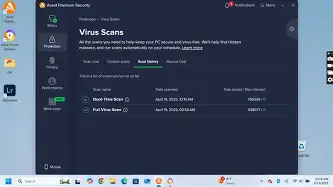
One of the first noticeable changes was the "Smart Scan" feature. Unlike traditional full-system scans that can grind a laptop’s hard drive to a halt, the Smart Scan in Avast Premium is designed to look for the most immediate vulnerabilities: outdated software, weak passwords, and active malware. This process completed in under three minutes on a standard SSD-equipped laptop, providing an immediate snapshot of the system's health without requiring the user to step away for a coffee break.
Deep Dive Analysis: Security Features and Real-World Protection
The core of Avast Premium Antivirus lies in its multi-layered defense mechanism. Unlike the free version of the software, the Premium tier introduces several "proactive" tools that go beyond simple virus signatures. For laptop owners who frequently connect to public Wi-Fi at coffee shops, airports, or hotels, the inclusion of an advanced firewall and Wi-Fi Inspector is arguably the most critical upgrade.
Advanced Firewall and Network Protection
Most laptop users treat Wi-Fi as a utility, rarely considering the vulnerabilities of the networks they join. During the testing period, the Avast Firewall acted as a gatekeeper, monitoring all incoming and outgoing traffic. What makes this version "Premium" is the level of granularity provided. It doesn't just block unauthorized access; it monitors for "Packet Spoofing" and "Port Scanning" attempts—tactics often used by malicious actors on shared networks to find a way into a user’s machine. The software successfully flagged several "untrusted" discovery requests while connected to a public library network, proving that the threat is often closer than one might think.
Ransomware Shield
Ransomware remains the nightmare scenario for any laptop user. The loss of years of photos, work documents, and sensitive files can be devastating. Avast Premium solves this through a dedicated Ransomware Shield that creates a "protected" umbrella over specified folders. During a simulation, an unauthorized script attempted to modify files within the Documents folder. Avast immediately blocked the change and alerted the user, preventing the encryption process before it could even begin. This "Zero-Trust" approach to file modification is a hallmark of premium security that standard defenders often struggle to replicate with the same consistency.
Web Shield and Phishing Defense
The browser is the primary gateway for modern threats. Avast’s Web Shield works as an invisible layer between the laptop and the internet. In real-world usage, this manifested as a subtle but firm blocking of "copycat" websites. When navigating to what appeared to be a standard banking login page via a redirected link, the Web Shield identified the site as a malicious clone. This is powered by Avast's massive global network of sensors, which updates the database in real-time as new threats emerge globally.
Performance Impact: The "Silent" Antivirus
A common grievance among laptop owners is that antivirus software ruins the speed of their machine. Laptops, particularly those with mid-range processors or limited RAM, can struggle when a security suite insists on scanning every single file in real-time. This is where Avast Premium Antivirus showed its most impressive refinement. The "Do Not Disturb" mode automatically detects when an application is running in full-screen—whether it’s a video conferencing tool like Zoom or a high-end creative suite like Premiere Pro—and silences all notifications and background heavy-lifting.
Find top-rated Laptops & Computers products at great prices.
Browse Now →Resource monitoring showed that Avast Premium typically idles at less than 150MB of RAM and maintains CPU usage below 1% during standard workflows. For a user on a MacBook Air or a Dell XPS, this means the fan doesn't start spinning just because the antivirus is running a background check. The "Hardened Mode," which is optional, was also tested. This mode only allows applications to run if they are known to be safe, which is an excellent feature for those who want maximum security at the cost of a slightly more restrictive environment.
Privacy and Extras: Webcam and Data Shredding
Privacy concerns on laptops often center around the hardware itself. The "Webcam Shield" in Avast Premium addresses the fear of visual spying. It requires every application—even trusted ones—to ask for permission before accessing the laptop's integrated camera. For the professional working from a bedroom or home office, this provides a psychological and digital layer of security that a simple piece of tape cannot fully replace.
Additionally, the "Data Shredder" feature proved useful when preparing an old laptop for resale. Standard file deletion doesn't actually remove data; it just marks the space as available. Avast’s shredder overwrites the data multiple times, ensuring that sensitive financial records or personal IDs cannot be recovered using forensic software. While a niche feature for some, it adds significant value for those who cycle through hardware every few years.
Comparison of Security Tiers
To understand why a switch to the Premium tier is noteworthy, it is helpful to see how it compares to standard or basic protection levels. Below is a breakdown of how Avast Premium Antivirus stacks up against basic security offerings often found pre-installed on laptops.
| Security Feature | Basic/Built-in Protection | Avast Premium Antivirus |
|---|---|---|
| Malware/Virus Protection | Standard/Signature Based | Real-time Behavior Analysis |
| Ransomware Protection | Limited/Manual Setup | Automated Shielding |
| Firewall Management | Basic Inbound/Outbound | Stealth Mode & Leak Protection |
| Public Wi-Fi Security | None/Passive | Active Network Inspection |
| Webcam Protection | None | Permission-based Access |
| Email Shield | Basic Spam Filter | Malicious Attachment Scanning |
| System Speed Priority | Often Resource Heavy | Optimized "Do Not Disturb" Mode |
The Pros and Cons of Making the Switch
While the overall experience was overwhelmingly positive, no software is without its trade-offs. It is important for laptop users to weigh these factors based on their specific hardware and usage patterns.
- Pros:
- Exceptional Threat Detection:consistently ranks at the top of independent laboratory tests for malware blocking.
- Optimized for Laptops: The software is specifically tuned to recognize when a laptop is on battery power or running intensive apps, minimizing drain.
- Comprehensive Privacy Suite: Features like Webcam Shield and Sensitive Data Shield offer modern solutions to modern privacy concerns.
- Cross-Platform Consistency: For users who have a laptop, a desktop, and a mobile device, the license covers multiple operating systems seamlessly.
- Intuitive UI: A rare example of security software that is powerful enough for experts but simple enough for casual users.
- Cons:
- Initial Notification Volume: Upon first installation, the software may prompt the user with several recommendations that can feel intrusive until customized.
- Price Point: As a premium service, it requires an annual financial commitment compared to free alternatives.
- Deep Scanning Time: While Smart Scans are fast, a full "Deep Scan" can take a significant amount of time if the laptop has a large, cluttered hard drive.
Laptop Buying Guide: Selecting the Right Security for Your Machine
When purchasing a new laptop or upgrading an existing one, security should be a primary consideration. Not every user needs a premium suite, but most will find that the investment pays for itself in avoided downtime and data recovery costs. Use the following criteria to determine if a switch to a premium suite like Avast is right for you.
The Professional/Freelancer Profile
If your laptop is your primary source of income, the risk of technical failure is high. Professionals often handle client data that must be kept confidential. For this user, the "Sensitive Data Shield" in Avast Premium is a vital asset. It automatically scans for files containing social security numbers, bank details, or passwords and places them under an extra layer of protection. This group should prioritize security over cost every time.
The Student Profile
Students use their laptops in high-traffic, high-risk environments like campus Wi-Fi networks and libraries. They are also prone to downloading a wide variety of software and files for research. A premium suite with a strong "Web Shield" is essential here to prevent accidental downloads from legitimate-looking but malicious academic sources. The "Silent Mode" is also a massive plus for those who don't want an antivirus pop-up appearing during a presentation in class.
The Casual Home User
For someone who primarily uses a laptop for social media, streaming, and light email, the decision is more about peace of mind. If you are someone who frequently forgets to update software or clicks on links without thinking twice, the "Software Updater" feature in Avast Premium—which automatically patches vulnerable apps like Chrome or Adobe—provides a safety net that basic antivirus simply doesn't offer.
Shop the latest Laptops & Computers picks on Amazon.
See Deals →Key Hardware Considerations
Before installing any premium security, check your laptop’s specifications. While Avast Premium is optimized, it still performs best on machines with at least 8GB of RAM. If you are running an older laptop with a mechanical Hard Disk Drive (HDD), you should schedule your deep scans for overnight periods, as the high I/O operations can make the machine feel sluggish during the process. For those with modern NVMe SSDs, the impact is virtually undetectable.
Advanced Techniques: Customizing Avast for Maximum Efficacy
Once the switch is made, "setting and forgetting" is fine, but a few minutes of customization can enhance the experience. Dive into the Protection settings to enable "PUP" (Potentially Unwanted Program) detection. This catches those annoying toolbars and system "cleaners" that often sneak in with other software downloads. Furthermore, laptop users should configure the Wi-Fi Inspector to notify them if anyone new joins their home network—a great way to ensure your bandwidth isn't being siphoned by neighbors.
Another powerful feature is the "Rescue Disk." In the event that a laptop becomes so infected it won't boot, Avast allows you to create a bootable USB drive. This is a pro-level tool that can save a machine from a total wipe. Carrying a Rescue Disk in your laptop bag is the ultimate insurance policy for the road warrior.
The Evolution of Digital Safety
The transition to Avast Premium Antivirus highlights a broader shift in digital safety. We are moving away from a world where "not having a virus" is the goal, toward a world where "total privacy and system integrity" is the standard. Modern threats are no longer just loud, system-crashing bugs; they are quiet data miners, silent ransomware scripts, and sophisticated identity theft attempts. Premium security is the infrastructure required to live and work in this environment without constant anxiety.
In the weeks following the switch, the most significant change wasn't a series of dramatic blocked attacks—though those did occur—but rather the sense of "quiet" that settled over the laptop. The system felt guarded but not burdened. The firewall did its job without asking for permission every five seconds, the web browser stayed clean, and the hardware performance remained snappy. This balance between ironclad protection and system fluidity is the primary argument for moving beyond the basics.
Final Thoughts
Switching to Avast Premium Antivirus for a laptop environment reveals that the value of paid security isn't just in the scanning engine—it's in the auxiliary protections that cover the gaps in our digital habits. From protecting the webcam to securing public Wi-Fi connections and ensuring your most sensitive documents are encrypted, the suite offers a comprehensive safety net that reflects how we actually use our portable computers today.
For the average laptop owner, the "What Happened" after the switch is quite simple: the laptop became a more reliable tool. The constant worry of clicking the wrong link or connecting to the wrong network diminished, replaced by a streamlined, silent guardian that manages the complexities of modern cybersecurity in the background. While there is a cost associated with this level of protection, the prevention of a single ransomware incident or identity theft attempt makes it a sound investment for anyone who relies on their laptop for their professional or personal life. Security is rarely something you appreciate until it fails; choosing a premium path ensures that failure is a distant possibility rather than an impending event.